


GMC Infotainment System

There are few things more frustrating than a frozen Infotainment system in your car. Modern vehicles rely almost entirely on the “Infotainment” central touch screen for all their non-driving functions, including music, navigation, and even air conditioning. So when your GMC Infotainment system stops working, won’t connect, or completely freezes up, you need a solution. Unfortunately, that solution is not always obvious. Fiddling with the buttons and turning the car off and back on again may not work.
Don’t worry, there’s a solution. Before heading to the dealership, try these steps to reboot your GMC Infotainment system. These are the same steps your mechanic would follow.
Details About the Infotainment System in GMC
GMC Infotainment systems have been evolving since their initial release in 2014. Originally, vehicles used the Mylink or Intellilink software systems. In 2017, this upgraded to the GM Infotainment software, and in 2022, they added built-in Google functionality.
Knowing which year your vehicle was released will help you identify the right Infotainment fix.
How to Reset a GMC Infotainment System
First, identify the year and model of your vehicle. This will direct you toward which version of the GMC Infotainment system you are working with. Then you can use the following steps on how to reboot your GMC Infotainment system.
These are the solutions that automakers share with their own dealerships and service technicians, according to Consumer Reports.
- 2017-2019: Mylink or Intellilink Systems
- Press the ‘Home’ and ‘Fast Forward’ buttons together.
- Hold for at least 10 seconds.
- 2017-2019: GM Infotainment System
- Press the ‘Onstar’ call button
- Then, hang up immediately. (yes, really)
- 2019-2023: GM Infotainment w/out Google
- Turn off the car
- Then turn it back on again.
- 2022+: GMC Infotainment with Built-In Google
- Park the car, put the car in “park”
- Press and hold the ‘Phone Hangup’ button on the steering wheel
- Hold it for 10 seconds
What If It Doesn’t Work?
If you’ve done the GMC Infotainment reset procedure and it doesn’t work, you still have a few options.
- First, try the solutions for the versions just before and after yours. Maybe your Infotainment system version came from a different batch based on the model production time, location, or trim.
- Next, turn the car and your phone off and back on again..
- Check for software updates on your car and phone.
If all else fails, take a video of your Infotainment system not working and bring your car into a GMC dealership.
Features of the GMC Infotainment System
Dash Radio control
Virtual Controls: Virtual access to in-car buttons and knobs
- Glove box release
- Locks
- Headlights
- Dome lights
- Garage door remote
- One pedal driving
- Traction control
Monitor: Energy App monitor’s vehicle’s energy use and charging status
Off-Road and Trailer Control
- Off-Road App: pitch, roll, drift, angle, suspension
- Trailering App: trailer profiles, pressure monitoring, theft alert
Google Features
- Google Assistant
- Google Maps
- Google Play
Entertainment Apps
- Alexa
- iHeartRadio
- Weather Channel
- NPR One
- Pandora
- Spotify
- USA Today
- Wall Street Journal
- Washington Post
- New York Times
- Sirius XM
Stop In Today To Check Out Our Inventory of New and Used Vehicles
Infotainment systems are both the coolest and sometimes most challenging aspect of modern vehicles. When they work, they are like magic and can bring incredible functionality and hands-free entertainment to your vehicle. But if your Infotainment system freezes, it’s important to know the possible solutions.
Excited about the latest GMC Infotainment features? Need to replace a car with a faulty Infotainment system that’s always on the fritz? You can explore new and used GMCs right here at Visalia GMC. Contact us today to find the new GMC for you.
GMC Infotainment System FAQ
Why is my GMC Infotainment system frozen or unresponsive?
Modern GMC vehicles rely on the Infotainment system for music, navigation, climate control, and more. Freezing can occur due to software glitches, outdated software, or connectivity issues.
How can I reset my GMC Infotainment system?
The reset method depends on your vehicle’s year and system:
- 2017–2019 Mylink/Intellilink: Press ‘Home’ + ‘Fast Forward’ for 10 seconds.
- 2017–2019 GM Infotainment: Press the ‘OnStar’ button and hang up immediately.
- 2019–2023 GM Infotainment (without Google): Turn the car off and on again.
- 2022+ GMC Infotainment (with Google): Park the car, then hold the ‘Phone Hangup’ button on the steering wheel for 10 seconds.
What if the reset doesn’t work?
Try the reset methods for the system versions before or after yours. Also:
- Turn off and restart your car and phone.
- Check for software updates.
- If unresolved, record the issue and visit a GMC dealership.
What features does the GMC Infotainment system include?
Key features include:
- Dash radio and virtual controls
- Glove box release, locks, and lights
- One-pedal driving and traction control
- Off-Road and Trailering apps
- Google features: Maps, Assistant, Play, and entertainment apps (Spotify, Pandora, SiriusXM, etc.)
Where can I find help or a new GMC vehicle if my Infotainment system is faulty?
You can visit Visalia GMC to check out new and used vehicles or schedule service for your current GMC.

We’ve all experienced the fading key fob battery. First, you need to be closer to lock/unlock the car. Then, you have to hold up the key to get your car started. Finally, your dash alert tells you that your key battery is low. GMC key fob batteries are tiny, and your car lasts much longer than that little battery in the fob.
You will probably need to change your GMC key battery a few times during the vehicle’s lifespan, so it’s important to know how to replace the Battery in a GMC key fob. Fortunately, the process isn’t hard at all.
Signs Your GMC Key Fob Battery Needs Replacement
- Reduced range
- Delayed response
- Inconsistent button function
- No response at all
How to Change a GMC Key Fob Battery
How do you change the battery in your GMC key fob? Don’t worry—GMC made this process quick and easy.
Supplies
-
1 Replacement CR 2032 Coin Battery
-
1 tiny flat-head screwdriver (optional)
Step 1: Remove the Emergency Key
Start by removing the emergency key. Its base is the keychain loop on the top of your key fob.
-
Hold the key fob firmly by the sides, near the bottom.
-
Press the tiny button near the top of the key fob. It’s a little rectangle.
-
Pull the top of the key fob away from the case.
This reveals your emergency key. You can use it to unlock the doors and, in some models, drive your car if your key fob battery has died.
Step 2: Pop Open the Key Fob Case
The next step is to open your key fob case. It has a front and back, and the emergency key is designed to pop them apart for you.
-
Identify the slot the emergency key came out of.
-
Poke the end of the emergency key into that slot.
-
Turn the emergency key sideways to gently force the two halves of the case open.
Step 3: Pop Out the CR2032 Battery
The battery case will come apart into two halves. The front half has a circuit board—leave that alone. The back half has the battery nestled into a tiny plastic frame. The battery looks like a silver coin.
-
Use your tiny screwdriver, or your fingernail, to pop the battery out of the case.
-
You may notice that the back of the battery is visible.
Step 4: Insert a New CR2032 Battery
Now, you’re ready to pop the new battery in.
-
Unwrap your new coin battery.
-
Make sure that the front (labeled) side of the battery is facing toward the plastic of the case, and the back is facing you.
-
Press the back gently with your thumb until the battery pops into the circular frame.
The new coin battery will click right into place.
Step 5: Put the Key Fob Back Together
The final step is to put your key fob back together. This is simple and quick.
-
Align the two halves and press them together. They will click and close firmly.
-
Slide the emergency key back into its slot. It will also click into place.
Test your battery by tapping the lock/unlock buttons. If your GMS beeps, your battery replacement has been a success.
What Else You Need to Know
You’ve successfully replaced your GMC key fob battery, but you might still have some questions. Let’s clarify them.
What Type of Battery Is Used in the Key Fob?
-
CR2032 Coin Battery
The replacement battery you will need for a GMC key fob is a CR2032 coin battery. They are small, cheap, and easy to buy online. You can get a multi-pack of them and even rechargeable versions. Keep one fresh battery in your glove box and another in your junk drawer, just in case.
How Long Does a Key Fob Battery Usually Last?
-
1-4 years
Key fob batteries are “coin batteries”. They look like little silver coins and contain a tiny chip of lithium inside that holds a charge. These tiny batteries can last anywhere from 1-4 years inside a GMC key fob.
What Happens When My Key Fob Battery Dies?
-
The key fob stops working
-
You can use the emergency key
-
You replace the battery.
If your GMC key fob battery dies, don’t worry. First, it’s easy to replace. Second, there is a hidden emergency key inside your key fob that you can use to open the door. Many GMC models can also be started with the emergency mechanical key.
Stop In Today To Check Out Our Inventory of New and Used Cars
Ready to hear that sweet “beep beep” from a new GMC? You can find a diverse inventory of new and used GMCs here at Visalia GMC. Contact us today and we’ll help you find the right car for your lifestyle, routine, and personal sense of style.
GMC Key Fob Battery FAQ
What type of battery does a GMC key fob use?
GMC key fobs use a CR2032 coin battery, which is small, inexpensive, and widely available.
How long does a GMC key fob battery last?
Key fob batteries typically last between 1 to 4 years, depending on usage.
How do I replace the battery in my GMC key fob?
Remove the emergency key, pop open the key fob case, remove the old CR2032 battery, insert a new one with the correct orientation, and snap the case back together.
What should I do if my key fob battery dies?
You can use the emergency key inside the fob to unlock your car and, in many models, start it. Then replace the key fob battery following the steps above.
Do I need any special tools to replace the battery?
A tiny flat-head screwdriver can help, but your fingernail or the emergency key can also be used to open the case and remove the battery.
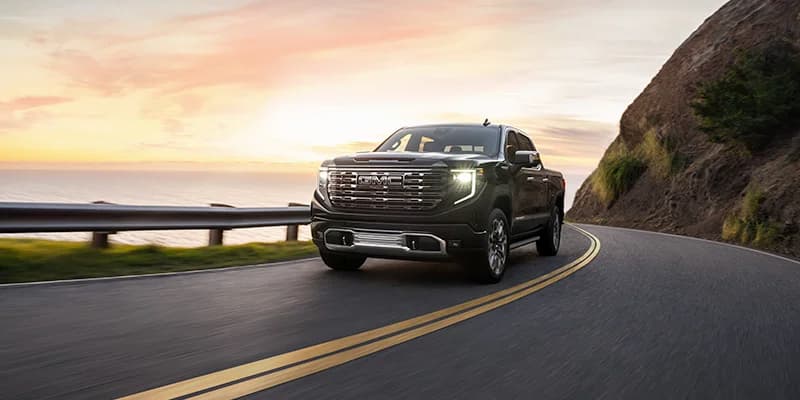
When you buy a pickup truck, it should be built to last. The GMC Sierra is a powerful truck and one of the most highly regarded working trucks on the market. You will often see Sierras in utility fleets and as a personal adventure and project vehicles, putting in the miles and hauling a wide range of heavy cargo. But the real question is, how many miles does a GMC Sierra 1500 last?
Good question. Whether you’re doing a daily route around the city or taking your Sierra on long road trips packed high with camping gear, that mileage is the real determiner of your GMC Sierra 1500’s lifespan.
Average Lifetime of a GMC Sierra 1500
How long do GMC Sierras last? The average lifespan of a GMC Sierra is 250,000 miles. That’s about 15 years of regular commuter distances, not considering road trips. This distance assumes average maintenance and attention to problems as they might develop. Of course, with attentive and frequent maintenance, your Sierra could last much longer, while neglected trucks put under heavy strain can potentially break down sooner than the average lifespan.
With great maintenance, the GMC Sierra 1500s have been known to last over 500,000 miles of utility and adventure.
How To Extend the Life of Your GMC Sierra 1500
It’s only natural to want your favorite truck to last a long time, maybe even double the average lifespan. To do this, you’ll want to attend to a few routine maintenance tasks and be proactive about repairs when issues emerge in the truck’s later life.
- Routine Oil Changes: Get your oil changed every 6 months or 5,000 miles. This will keep your engine running clean and smooth.
- Regular Inspections: Catch issues early and ensure regular tune-ups for performance. Schedule an inspection and maintenance visit at least once a year.
- Post-Adventure Cleaning: Clean up your Sierra after you go off-roading or on wet adventures. A little wash and quick dry (or a wipe-down) can prevent rust and other issues from developing.
- Proactive Repairs: Be proactive about repairs. Replace parts when they show signs of wear so that they don’t have a chance to break or do further damage to other parts.
What Could Shorten the Lifespan of Your GMC Sierra 1500
What can you avoid to ensure your GMC Sierra 1500 lasts as many miles as possible? A few behaviors always put extra wear and tear on your truck and can shorten its lifespan.
- Aggressive Driving: Drive smart. You’ll get the best and longest performance by driving in tune with the vehicle’s engine. Don’t rev the engine or skid the tires on turns. Feel the engine and let the vehicle define its movement patterns.
- Oversized Loads: Be mindful of your loads, both in the truck bed and when towing. Overly heavy loads are more likely to wear down your truck early.
- Poor Attention to Maintenance: Be attentive to maintenance, both routine tune-ups and repairs. Neglecting your truck can result in problems that get worse over time.
- Rust and Corrosion: Watch out for signs of rust and corrosion, which, if left unattended, could degrade the quality of your truck.
Stop In Today To View Our Inventory of New and Used Cars
Interested in test-driving a GMC Sierra 1500? Not sure which truck is right for you? You are welcome to explore our full inventory of new and used cars to find the perfect fit for your lifestyle and performance needs. Whether you have your heart set or an open mind, Visalia GMC is here to help you find the right vehicle today. Contact us to schedule a test drive or stop by any time.
Connect with us

